AI Viral Video Analyzer

See Why a Video Will Pop or Flop

ViralWatch is an AI viral video analyzer for TikTok, Reels, and YouTube Shorts. Upload your draft. Get your verdict.

Analyze TikTok videos, Instagram Reels, and YouTube Shorts with AI before or after posting. Get clear retention insights, viral signals, and practical edits that improve your next result.

Built for creators who search for a TikTok analyzer, Reels hook checker, or YouTube Shorts retention review tool and want a real publish-or-rework answer.
  • TikTok, Reels, Shorts
  • Hook + Retention Signals
  • Private Uploads
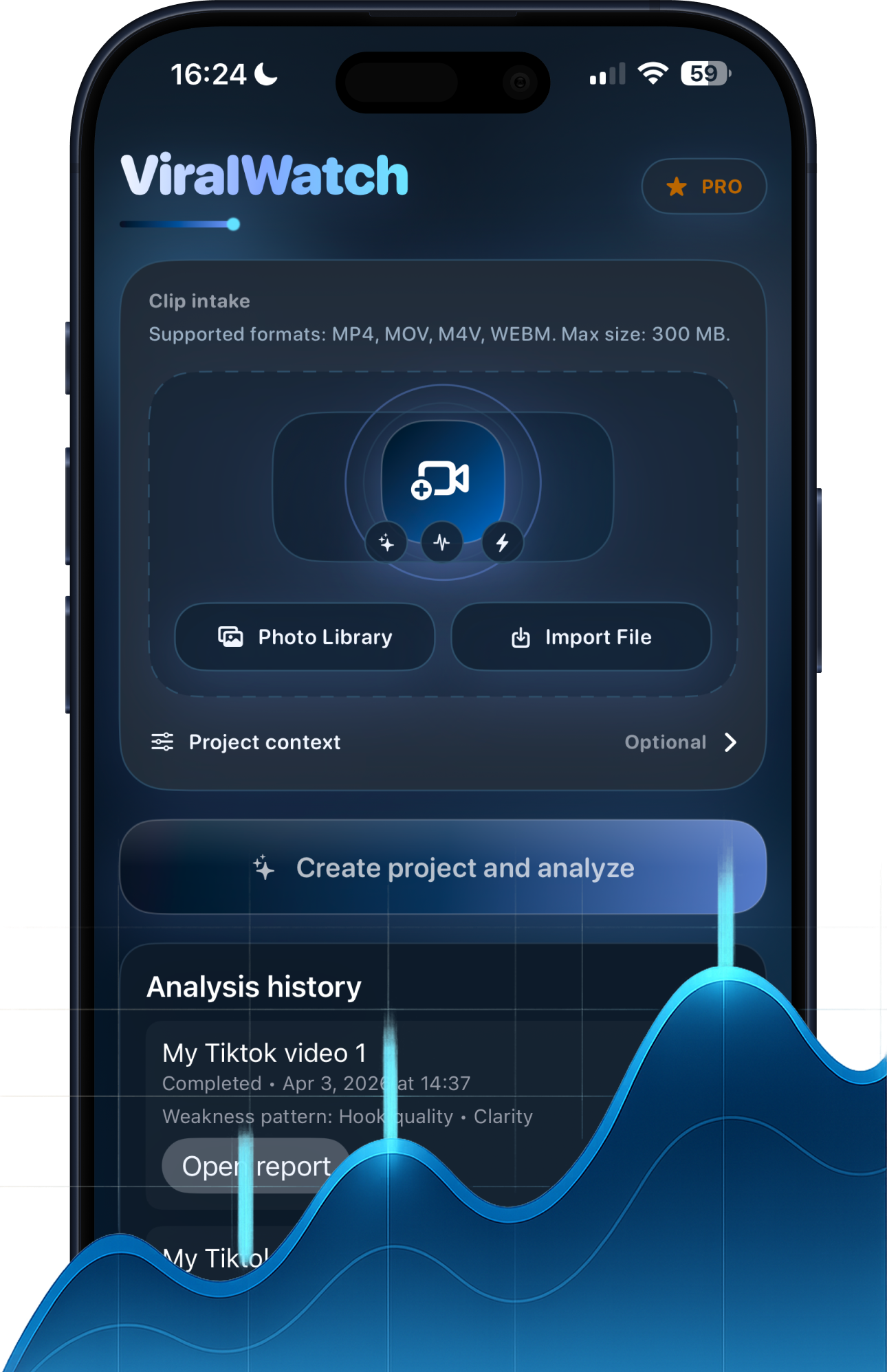
ViralWatch app screenshot showing upload intake and analysis history

ViralWatch at a glance

What it is
ViralWatch — a native iOS app that analyzes short-form video drafts before you post.
Platforms analyzed
TikTok, Instagram Reels, and YouTube Shorts (vertical short-form video).
What you get
Hook-strength score (0–100), a timestamped retention-risk map, a replay-potential rating, and a publish-or-rework verdict with concrete edit suggestions.
How it is different
It scores the unpublished draft file before posting — not post-hoc analytics on an already-published video.
Device
iPhone, iOS 16.0 or later.
Pricing
Free first analysis, then $17.90/month or $49.90/year ($4.16/mo).

What is ViralWatch?

ViralWatch is an AI-powered viral video analyzer built as a native iOS application. It is designed specifically for short-form video creators on TikTok, Instagram Reels, and YouTube Shorts who want to analyze their video drafts before publishing. ViralWatch outputs a hook strength score, a retention risk map with timestamped drop-off predictions, a replay potential rating, and a publish-or-rework verdict with specific edit recommendations. Unlike post-publish analytics dashboards, ViralWatch analyzes unpublished drafts — allowing creators to fix weak hooks, cut dead air, and improve structure before any real audience sees the video.

How creators use ViralWatch to analyze TikTok, Reels, and Shorts before posting

The workflow is upload-first. Instead of posting and hoping, a creator exports a draft, imports it into ViralWatch straight from the camera roll, and reads the analysis before the video ever reaches an audience. The report grades the hook in the first three seconds, maps where viewers are most likely to drop off, and rates how repeatable the video feels on a loop.

From there the decision is concrete: publish as-is, or rework a specific moment first. Because the feedback arrives before posting, edits are cheap — you sharpen the hook, trim dead air, or re-sequence a beat, then re-run the analysis to confirm the score improved on the version you will actually publish.

Common questions

What iOS devices does ViralWatch support?

ViralWatch runs on iPhone with iOS 16.0 or later. You import a draft from your camera roll and review the analysis before posting.

How accurate is ViralWatch's viral prediction?

ViralWatch does not predict exact view counts or guarantee virality. It identifies structural risk factors — hook weakness, retention drop-off patterns, and low replay signals — that correlate with underperformance in short-form algorithm distribution. Creators use the score as a decision-making framework, not a guarantee.

Who is ViralWatch for?

ViralWatch is built for independent creators on TikTok, Instagram Reels, and YouTube Shorts who produce their own content. It is particularly useful for creators in the growth phase (1,000–500,000 followers) who want to eliminate preventable errors before posting.

What ViralWatch Analyzes

Creators get a verdict, not generic advice.

ViralWatch helps creators decide publish-or-rework with score-backed analysis for hook strength, retention risk, and replay potential, plus concrete edits to test next.

Step 1

Upload

Upload a TikTok, Reel, or Short draft and give ViralWatch a clean file to evaluate before you commit to a post.

Step 2

Diagnose

Review hook strength, retention risk, replay potential, and the exact moment short-form momentum starts to slip.

Step 3

Refine

Apply edit suggestions, rewrite the opening seconds, and ship the next version with a more defensible viral score.

Insight layers that justify every subscription dollar

The score is the headline. The explanation is where decisions are made.

Short Video Analysis

Analyze TikTok, Reels, and Shorts with creator-focused performance signals.

Viral Score

Get a simple AI score based on hook quality, pacing, clarity, and replay potential.

Hook Feedback

See whether the first seconds are strong enough to stop the scroll.

Edit Suggestions

Find dead moments, weak transitions, and scenes that should be shortened or reordered.

Next Video Ideas

Turn one analyzed clip into follow-up content angles, hooks, and caption directions.

Private Uploads

Your videos and analytics stay protected with privacy-first defaults.

Inside ViralWatch

How ViralWatch works for TikTok, Reels & Shorts creators

ViralWatch is positioned as an AI short-form video analyzer, so the homepage now shows the actual upload flow and the scorecard creators expect when they search for TikTok analytics, hook review, or Reels retention feedback.

  • AI TikTok analyzer for weak hooks, retention drops, and replay potential.
  • Instagram Reels and YouTube Shorts feedback before you burn posting momentum.
  • Short-form video optimization notes that turn one report into the next better cut.
ViralWatch app screenshot showing video upload intake and analysis history for short-form creators.

Upload, scan, and compare drafts before posting

Review a clean intake flow, start analysis in one tap, and keep draft history visible when a TikTok, Reel, or Short needs another pass.
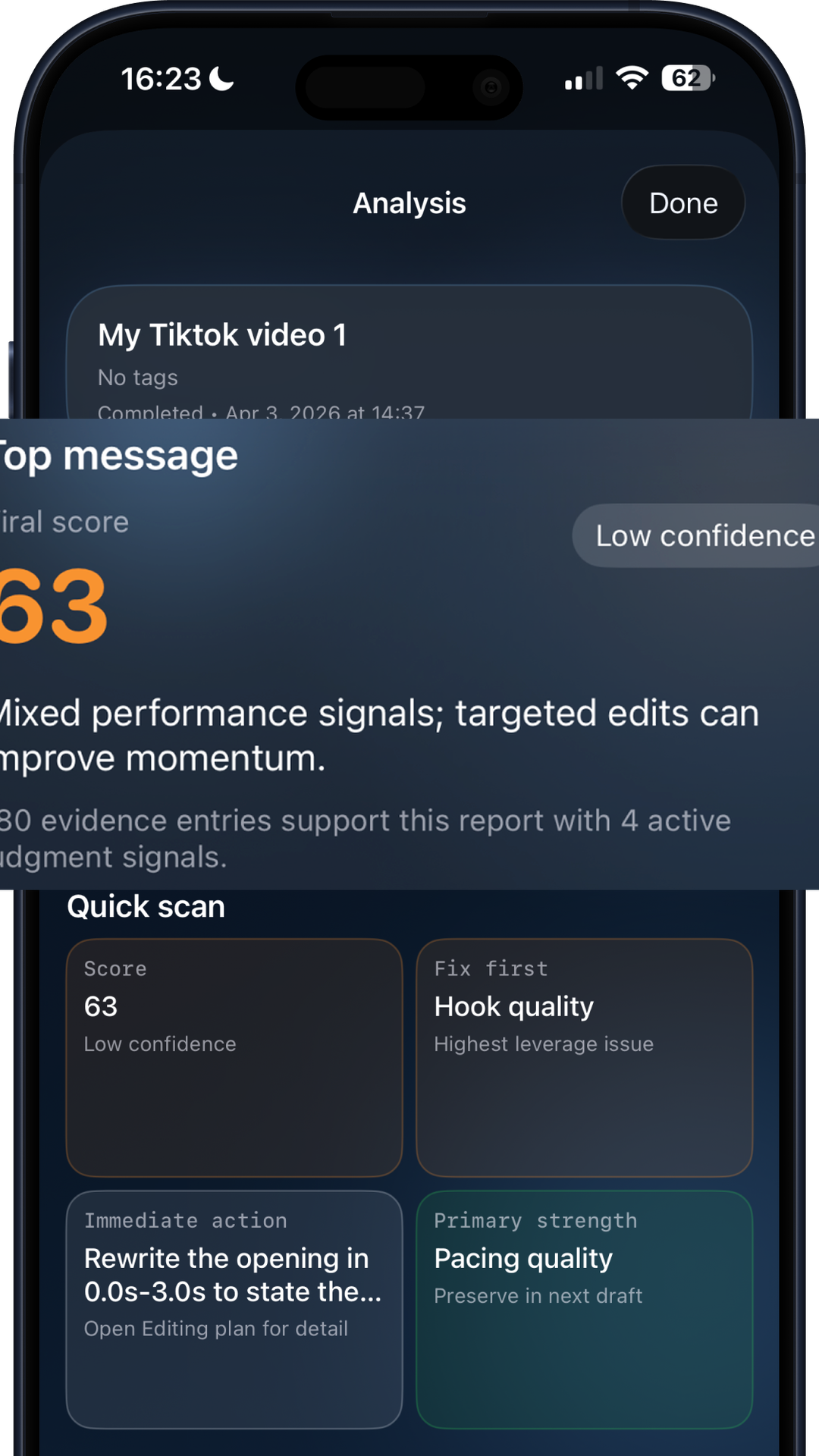
ViralWatch app screenshot showing hook diagnostics, replay signals, and creator guidance cards.

Read the diagnostics that show what to fix next

See hook strength, replay signals, and concrete guidance that helps you decide whether the cut is ready to publish or needs another pass.

Product Description

What ViralWatch measures in your draft

Use ViralWatch before publish to catch weak hooks, retention drop points, and replay blockers while edit costs are still low across TikTok, Reels, and Shorts workflows.

This homepage now supports search intent around AI video analysis for TikTok, Instagram Reels, and YouTube Shorts with clearer product visuals, stronger descriptive copy, and direct paths into support, pricing, and creator education pages.

Use Cases

  • Pre-publish QA for TikTok, Reels, and Shorts drafts before posting.
  • Post-publish diagnosis when views arrive but watch depth or rewatches stay weak.
  • Shared review workflow for creators, editors, and managers who need one scorecard language.

Compatibility

  • Built for TikTok, Instagram Reels, and YouTube Shorts workflows.
  • Upload support: MP4, MOV, M4V, and WEBM clip files.
  • Available on iOS with App Store billing and restore support.

Usage Guidance

Setup

  • Start with a clean 9:16 export and include the full hook moment in the first three seconds before upload.
  • Analyze one draft version at a time, then label each revision so score changes map to specific edits.

Care and Maintenance

  • Re-run analysis after each meaningful cut change; stale reports should not guide new publish decisions.
  • Keep source clips, captions, and music references grouped so recommendations stay traceable across revisions.

Best-Fit Scenarios

  • Best for pre-publish QA, post-publish diagnosis, and weekly creative retrospectives across creator teams.
  • Most useful when comparing at least two draft variants before committing budget or posting cadence.

Common Mistakes

  • Do not treat one score as a guarantee; review hook, retention, and replay notes together before deciding.
  • Avoid uploading heavily compressed previews because artifact noise can distort pacing and clarity signals.

Boundary Conditions

  • ViralWatch evaluates the uploaded file only and cannot read audience targeting, paid boosts, or hidden platform distribution factors.
  • If a clip has missing audio, broken aspect ratio, or an incomplete ending, fix export quality first and analyze again.

Technical Specifications

ViralWatch technical specifications
Specification Value Unit Coverage
Supported short-form platforms 3 platforms TikTok, Instagram Reels, YouTube Shorts
Accepted upload containers 4 formats MP4, MOV, M4V, WEBM
Core diagnostic modules 3 modules Hook strength, retention risk, replay potential
Available paid plan options 2 plans Monthly, yearly

Known Constraints

  • Does not guarantee exact future views or algorithm placement.
  • Analyzes the clip you upload and cannot read hidden distribution boosts from social platforms.
  • Best results require clear exports and real creator context before final publish decisions.

Report Preview

Know what to fix before your audience decides.

Every analysis returns a clear score and actionable notes. You can review drafts before posting or diagnose weak live videos.

That makes ViralWatch useful for creators searching terms like video hook analyzer, short-form retention checker, or AI viral score app rather than a generic social media dashboard.

Viral Odds

82

Hook

8.6

Retention

6.9

Replay

7.8

Paywall Cues

Free signal. Paid depth.

The free layer gives a direction fast. Premium plans unlock the full report and deeper iteration workflow.

  • Unlimited video analyses Included
  • Advanced viral scoring Included
  • Hook and retention breakdowns Pro
  • Edit and repost suggestions Pro
  • Caption and angle ideas Pro

Social Proof

Trusted before publish, not after disappointment

ViralWatch is used by creators, editors, and manager teams that need faster decision loops.

5.0

Average site feedback rating

3

Creator reviews

3

Major short-form platforms supported

"It helps our team decide which draft to publish and which one to re-edit before posting."

Ava R.

Creator Manager

Verified site feedback • Verified subscription usage • Mar 11, 2026

"ViralWatch gives me faster feedback than manually reviewing every cut with the client."

Jordan K.

Short-Form Editor

Verified site feedback • Verified report export • Mar 10, 2026

"The hook analysis made it obvious why my video lost momentum in the first three seconds."

Mia T.

UGC Creator

Verified site feedback • Verified analysis run • Mar 8, 2026

Moderation status: 3 approved, 1 pending, 1 rejected.

Browse verified user reviews

Ratings snapshot last synced on 2026-05-07.

Why Pay

Pay for clearer decisions, not more dashboards

Start with quick signal checks, then unlock full analysis depth when your publishing cadence requires it.

Free Layer

Fast score + directional feedback

Perfect for quick triage before committing edit time.

Premium Layer

Detailed report with deeper insight

Designed for creators and teams shipping content weekly.

Billing

App Store native subscriptions

Cancel anytime from Apple ID settings.

Price Transparency

Current prices
List prices are shown in USD before checkout.
Taxes and fees
Taxes and App Store fees may apply by country or region and are shown by Apple before confirmation.
Availability
Available now through App Store checkout on iOS.

Monthly

$17.90 / month
Current price
$17.90 / month
Discount
No promotional discount is currently applied.
Taxes and fees
Taxes and App Store fees may apply by country or region and are shown by Apple before confirmation.
Availability
Available now through App Store checkout on iOS.
  • Unlimited video analyses
  • Advanced viral scoring
  • Hook and retention breakdowns
  • Edit and repost suggestions
  • Caption and angle ideas

Secure App Store checkout opens in a new tab.

  • Secure App Store checkout
  • Card and billing details stay with Apple
  • Manage or cancel subscriptions in Apple ID settings

Review Privacy Policy , Terms of Use , Support before purchase.

Most Popular

Yearly

$49.90 / year

Equivalent $4.16/mo

Current price
$49.90 / year
Discount
No promotional discount is currently applied.
Taxes and fees
Taxes and App Store fees may apply by country or region and are shown by Apple before confirmation.
Availability
Available now through App Store checkout on iOS.
  • Unlimited video analyses
  • Advanced viral scoring
  • Hook and retention breakdowns
  • Edit and repost suggestions
  • Caption and angle ideas

Secure App Store checkout opens in a new tab.

  • Secure App Store checkout
  • Card and billing details stay with Apple
  • Manage or cancel subscriptions in Apple ID settings

Review Privacy Policy , Terms of Use , Support before purchase.

Frequently asked questions

Everything you need to know about ViralWatch.

What is ViralWatch?

ViralWatch is an AI viral video analyzer for iOS. You upload a TikTok, Instagram Reels, or YouTube Shorts draft before posting, and the app returns a hook strength score, retention risk analysis, replay potential rating, and a clear publish-or-rework verdict with specific edit suggestions.

Which platforms does ViralWatch support?

ViralWatch analyzes video drafts intended for TikTok, Instagram Reels, and YouTube Shorts. It focuses on short-form vertical video up to 10 minutes.

How does ViralWatch predict if a video will go viral?

ViralWatch uses AI to evaluate the same signals that short-form algorithm ranking correlates with: hook strength (viewer retention in the first 3 seconds), pacing and dead-air detection, replay indicators, and structural patterns common in high-performing content. It delivers a verdict score and specific timestamps where drop-off risk is highest.

Is my video kept private when I upload it to ViralWatch?

Yes. ViralWatch is designed for draft analysis — your video is uploaded securely for analysis only and is not published or shared publicly. You analyze your content before it ever leaves your camera roll.

What is the difference between ViralWatch and checking TikTok or Instagram analytics after posting?

Platform analytics show what happened after your video was already seen by real viewers. ViralWatch gives you feedback before you post, so you can fix drop-off points, sharpen your hook, and improve retention before your audience decides. It replaces guesswork with a data-backed decision.

How much does ViralWatch cost?

ViralWatch offers a free analysis to get started. Paid plans start at $17.90 per month or $49.90 per year for full reports with detailed edit recommendations and unlimited analyses.

Can I use ViralWatch if I have fewer than 1,000 followers?

Yes. ViralWatch evaluates the video itself — hook quality, pacing, and structure — not your follower count. Small creators use it to find what to fix before posting, so each video gives them the best possible chance to reach new viewers.

How do I cancel my ViralWatch subscription?

ViralWatch subscriptions are managed through the Apple App Store. To cancel, go to Settings > Apple ID > Subscriptions on your iPhone, find ViralWatch, and tap Cancel Subscription. You will retain access through the end of your billing period.

Final CTA

Publish with conviction, not guesswork.

ViralWatch gives you clear feedback before you post and deeper guidance when every edit matters.

Social Sharing

Share this page

Share this canonical page URL with creators, collaborators, or your audience.